Chromatic Tuner for macOS
Pitch Perfect. Play Perfect.
±1¢ accuracy, eight historical temperaments and presets for bowed, folk, guitar and bass strings — native, offline, opens in 200 ms.
Why a Native App
A Real Tuner, on Core Audio.
Browser tuners reroute audio through the WebAudio sandbox — 12–60 ms of jitter, silent downsampling, throttled the moment the tab loses focus. Phone tuners can't see your audio interface at all — just the built-in mic, with auto-gain and noise suppression already mangling the signal before any pitch detector touches it.
Chromatic Tuner sits directly on Core Audio. It sees your USB interface at full sample rate, runs YIN on your CPU, and the needle responds the moment you pluck.
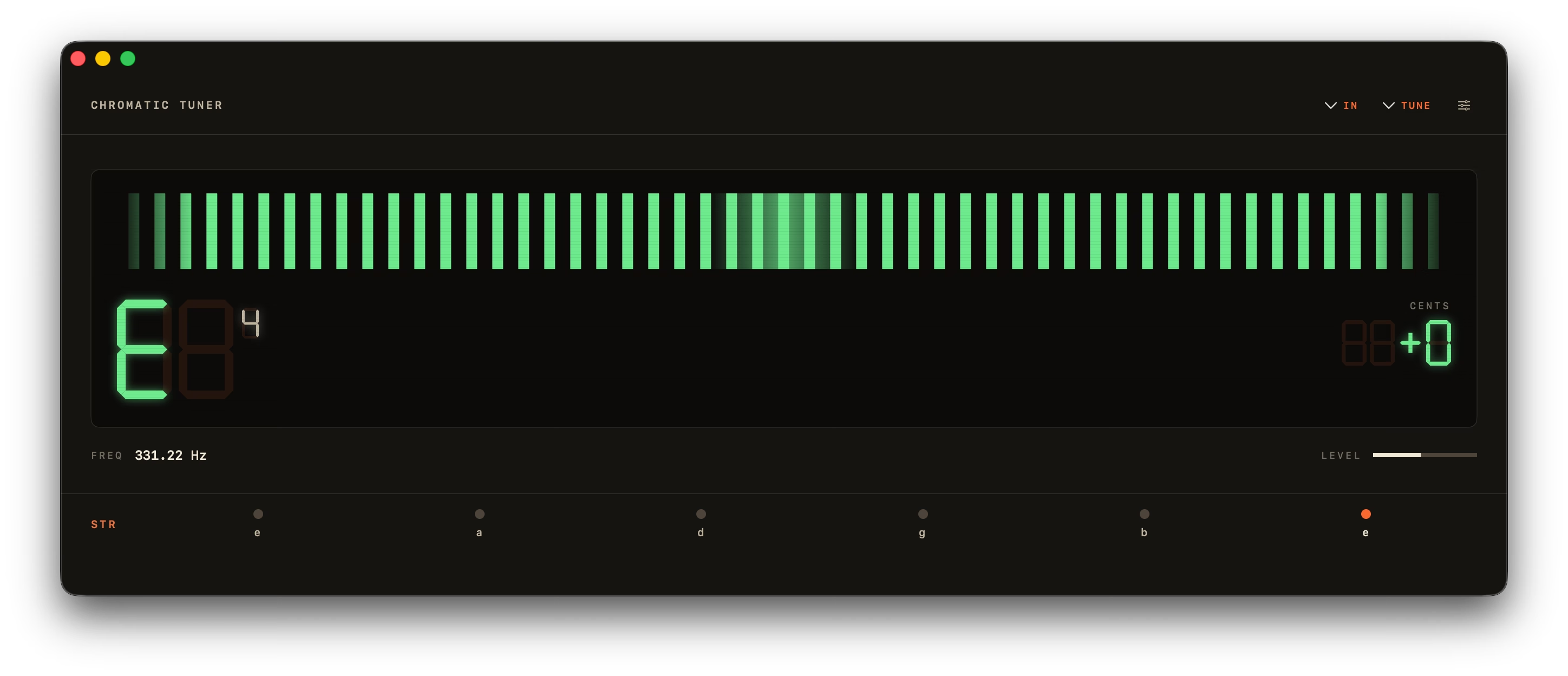
The Meter and the Strobe.
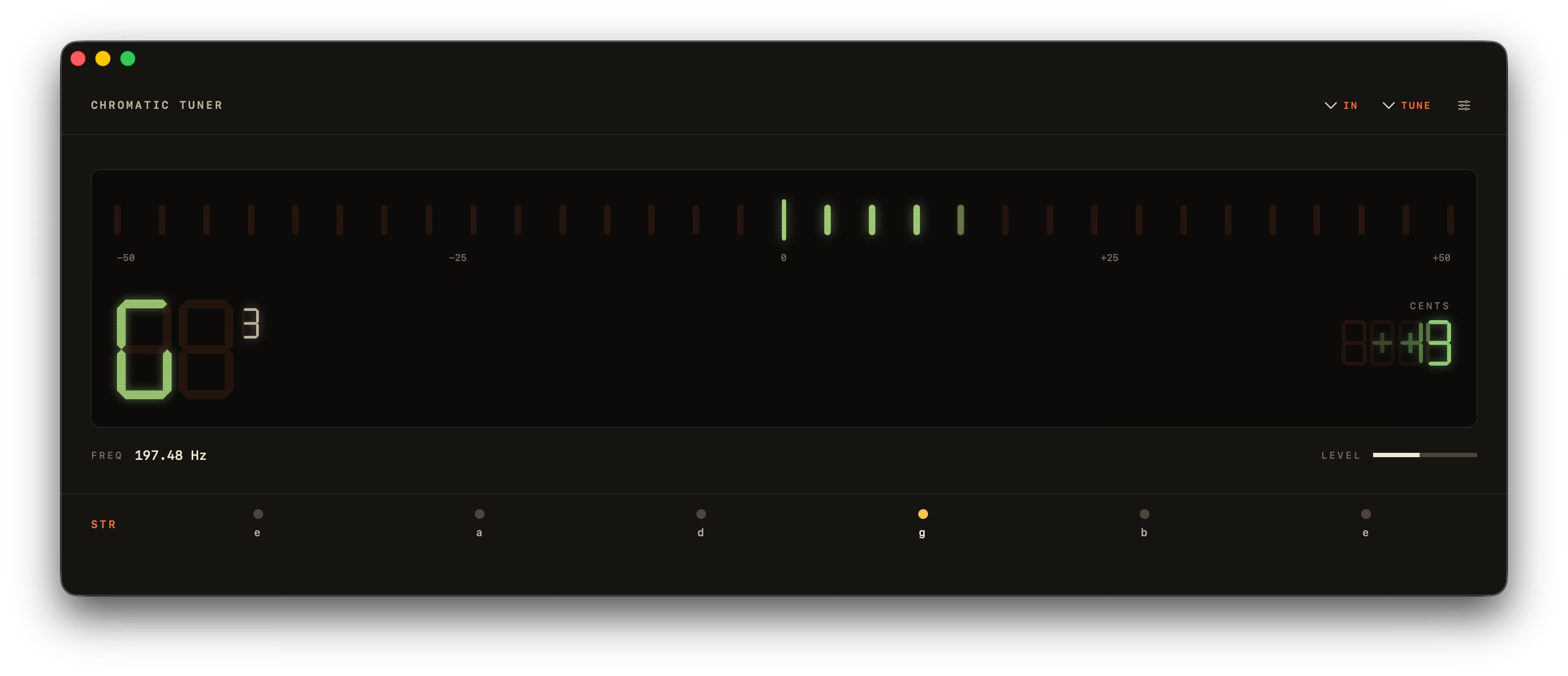
The 31-LED bar is what you reach for when plucking — segments blend orange to green and snap to in-tune in under 50 ms.
The Peterson-style rotating strobe is the one for sustained intonation work. Bands lock inside a hard ±0.5 ¢ deadband, so "in tune" is genuinely stationary — not just close. A vintage analog needle and a minimal drifting sine wave round out the four.
What's Inside
Nine Things, Done Well.
A tuner should be on screen for fifteen seconds, do its job, and get out of your way. Everything below earns its place by that rule.
YIN Pitch Detection
A0 to C8 (27.5 Hz – 4186 Hz), accurate to ±0.14¢ on pure tones and ±1¢ in real use. Octave-error correction stops a plucked string reading an octave high.
Four Display Modes
An LED bar, a Peterson-style strobe with a hard ±0.5¢ deadband, a vintage analog needle, and a minimal drifting sine wave — one toolbar click apart.
Built-In Metronome
40–240 BPM, meters from 2/4 to 7/8, tap tempo and an accented downbeat — in its own window, so it sits open beside the tuner while you practise. Space starts it.
Instrument Presets
17 across guitar, bass and strings.
Lives in Your Menu Bar
A 360 px popover, one click away.
Reference Tones
Tap a string to hear a clean sine.
Custom A4 + Transpose
349–499.9 Hz, plus ±11 semitones.
Light, Dark, System
Follows macOS, or pin it either way.
Keyboard-First
Space starts and stops. ⌘W, ⌘Q.
Design
Lives Wherever You Need It.
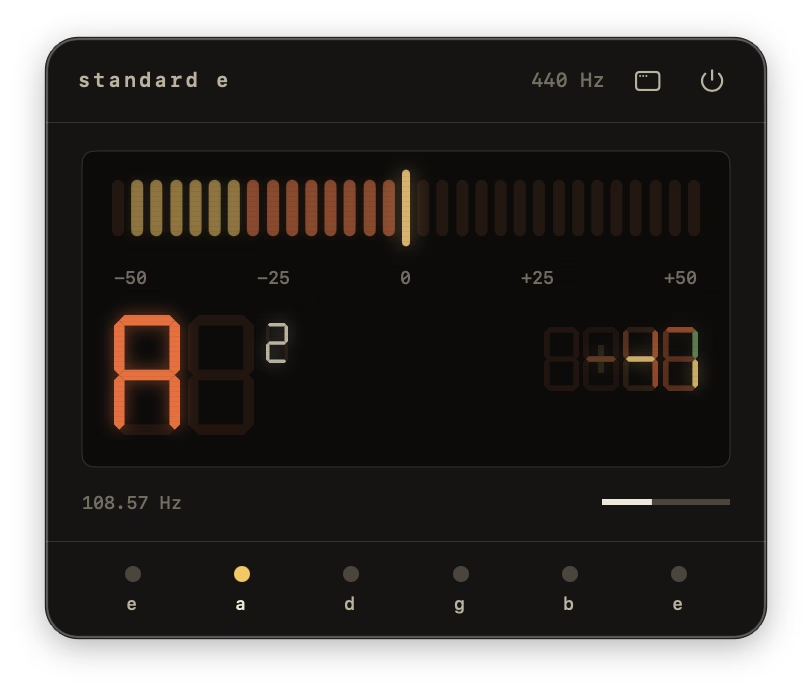
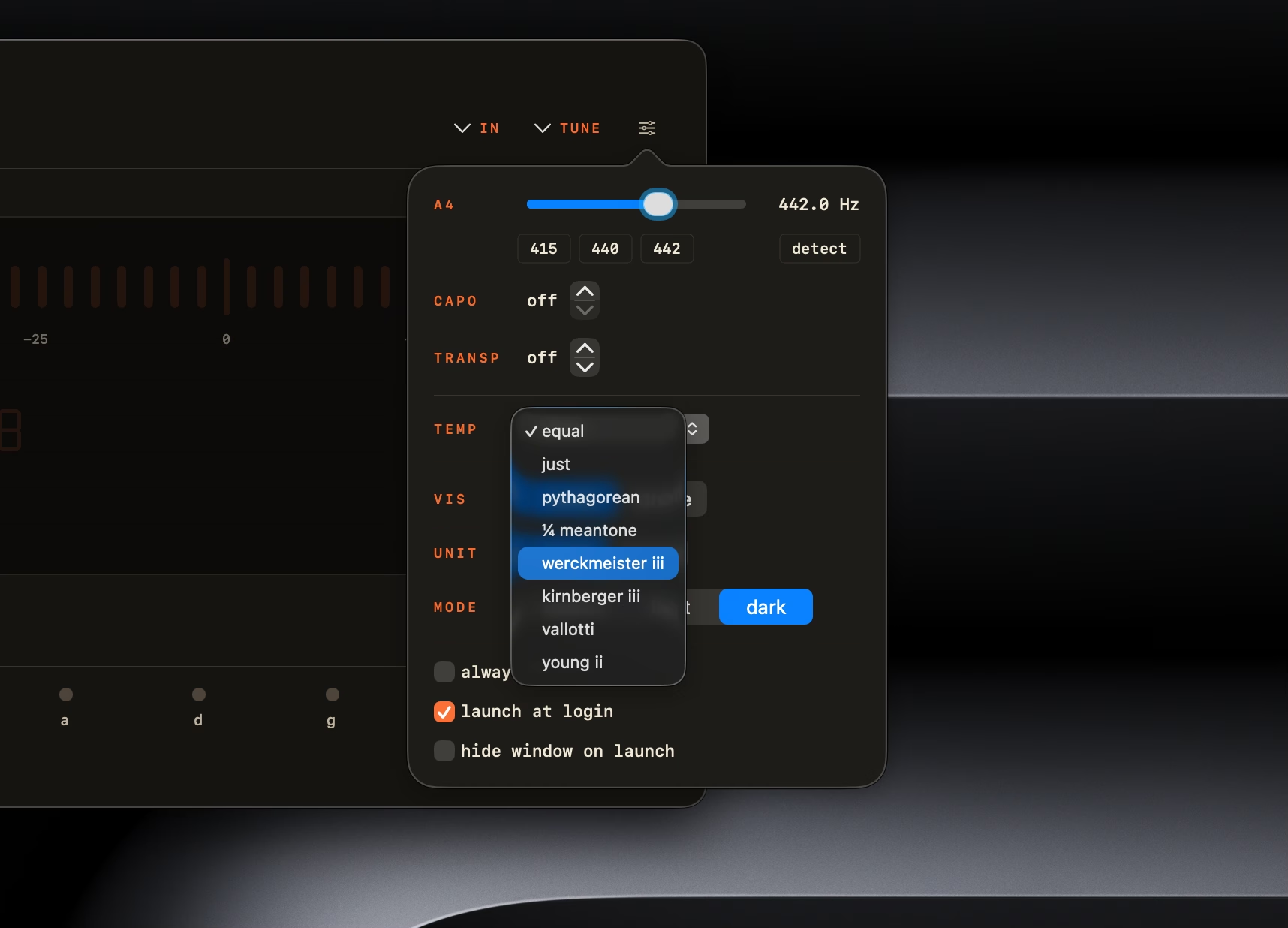
A 360 px popover that drops out of the menu bar between takes. Customization tucked behind a flyout. A dock icon that earns its slot. Every surface modeled on real hardware, then matched to your system theme.
Prefer the Mac App Store? Same app, same price.

Ready When You Are
One Purchase. Forever Yours.
Today's Total
One-Time · Lifetime 1.x Updates
- Chromatic Tuner — Universal Binary (Apple Silicon + Intel)
- Lifetime 1.x Updates Included
- Direct Email Support From the Developer
After You Pay
- 1Receipt to Your Email
- 2Download Link, Valid 7 Days
- 3Drag Chromatic Tuner Into /Applications
FAQ
Questions, Answered.
Quick answers about temperaments, instruments, accuracy, and what actually runs on your Mac.
Is Chromatic Tuner Free?
There's a free in-browser version at chromtuner.com/tune — it runs the same YIN pitch-detection engine in your browser, no signup, no download. The native macOS app is a one-time $6.99 purchase that adds Core Audio (sub-50 ms vs 12–60 ms in the browser), 15 instrument presets, 8 historical temperaments, capo, transpose, menu-bar mode, and offline use. No subscription, no trial-then-charge.What Does Chromatic Tuner Cost?
$6.99 one-time, paid through Stripe. That includes lifetime updates on the 1.x line — every bug fix, new tuning, new instrument preset, and performance improvement is free for life. No subscription, no recurring charges, no upsells. A future major version (2.0) would be a separate purchase, with a loyalty discount for existing 1.x customers.What Are the System Requirements?
macOS 14 Sonoma or later. Universal binary — runs natively on Apple Silicon (M1/M2/M3/M4) and Intel Macs. No additional hardware required; the built-in microphone works out of the box. Any USB audio interface or Aggregate Device that macOS recognizes (Focusrite, Universal Audio, MOTU, RME, etc.) is also supported via Core Audio at full sample rate.Does Chromatic Tuner Work Offline?
Yes. Chromatic Tuner runs entirely offline — no audio, telemetry, or account ever leaves your Mac. The app makes zero outbound network connections, and pitch detection runs locally on the CPU.Do I Need an Audio Interface?
No. Chromatic Tuner uses your Mac's built-in microphone by default, and works with any USB audio interface or Aggregate Device that macOS recognizes.How Is Chromatic Tuner Different From Free macOS Tuners?
Chromatic Tuner runs natively on Core Audio with sub-50 ms latency, ±1¢ YIN accuracy, no ads, no telemetry, and no account. Free tuners typically run in a browser tab (12–60 ms of WebAudio jitter) or hand the signal to a phone's built-in mic — auto-gain and noise suppression baked in before the tuner ever sees it. The $6.99 buys lifetime 1.x updates and direct email support.What's the Input-to-Display Latency?
Sub-50 ms perceived. Chromatic Tuner reads your interface at full sample rate via Core Audio, so the meter responds the moment you pluck. Browser-based tuners typically add 12–60 ms of WebAudio jitter on top.Does Chromatic Tuner Work With My USB Audio Interface?
Yes. Chromatic Tuner uses Core Audio at full sample rate with any USB interface or Aggregate Device macOS recognizes — Focusrite, Universal Audio, MOTU, RME, and others. Set your input device in System Settings → Sound and the app picks it up.What Instruments Are Supported?
Any pitched instrument in the human-audible range — guitar, bass, ukulele, mandolin, violin, brass, woodwind, voice. The eight presets target guitar and bass; chromatic mode covers everything else.How Accurate Is the Tuner?
Chromatic Tuner is accurate to ±0.14 cents on pure sine tones and ±1 cent in real-world use. The in-tune zone (green) opens at ±5 cents, which is what most studio engineers consider perfect intonation. Detection uses the YIN time-domain algorithm with a 4096-sample window, octave-error correction for plucked strings, and median-of-5 + exponential smoothing for stable readings at ~22 Hz.Does It Run on Intel Macs and Apple Silicon?
Yes — both. Chromatic Tuner is a universal binary that runs natively on Apple Silicon (M1/M2/M3/M4) and Intel Macs. macOS 14 Sonoma or later required.Is There a Free Trial?
There's a free browser-based version at chromtuner.com/tune that runs the same YIN engine — try it before you buy the Mac app. The desktop app adds Core Audio (sub-50 ms vs 12–60 ms in the browser), 15 instrument presets, 8 historical temperaments, capo / transpose, menu-bar mode, and offline use. If you're still on the fence after the browser version, email support@chromtuner.com for a direct reply, usually within a few hours.Can I Get a Refund?
If Chromatic Tuner doesn't run on your supported Mac or doesn't do what we advertise, email support@chromtuner.com and we'll fix it or refund you — no forms, no support tickets. EU law requires the disclosure that digital downloads waive the standard 14-day right of withdrawal once delivery starts. That disclosure is about consumer policy; a build that refuses to launch on Sonoma or later is on us regardless. Honest mistake purchases inside 24 hours are also refundable, just ask.Will I Get Future Updates?
Yes. Every 1.x update is included for life with your purchase — bug fixes, new tunings, performance work, additional instrument presets. Updates ship through the in-app updater (a daily check that surfaces a Download button when something new is available) so you don't have to keep an eye on the changelog manually.What Happens When 2.0 Ships?
Your 1.x copy keeps working forever — no kill switch, no subscription expiry, no online check. A future major version (2.0) would be a separate purchase, with a loyalty discount for existing 1.x customers. Until then, every bug fix, new tuning, and performance improvement on the 1.x line is included free. There's no roadmap commitment for when 2.0 ships; the priority is making 1.x as good as it can be first.Can I Run It From the Menu Bar Only?
Yes. Enable Menu Bar mode in preferences and a 360 px popover appears next to your other menu-bar icons. The main window can stay hidden.Does It Support Alternate Tunings, Capo, and Other Instruments?
Yes. Chromatic Tuner ships with 15 instrument presets: guitar (Standard, Drop D, DADGAD, Open G, Half-step Down, 7-string), bass (4-string EADG, 5-string BEADG), bowed strings (violin, viola, cello, double bass), folk (ukulele, mandolin, 5-string banjo), and pure chromatic. Capo position (off through fret 11), A4 reference, and ±11-semitone transpose are all adjustable.What Are Historical Temperaments and Which Ones Are Included?
Historical temperaments are alternative tuning systems used before equal temperament became dominant — each gives every key its own colour. Chromatic Tuner ships eight: Equal (modern default), Just Intonation (pure 5:4 thirds), Pythagorean (pure fifths), ¼-comma Meantone (Renaissance / early-Baroque), Werckmeister III (1691), Kirnberger III (1779), Vallotti (1779), and Young II (1799). All non-equal systems support a movable tonic from C through B.Does Chromatic Tuner Have a Strobe Display?
Yes. Toggle between two display modes: a 31-LED horizontal bar with hardware-accurate ticks and a Knight-Rider intro sweep, or a true Peterson-style rotating-band strobe with smoothstep speed curve and a hard ±0.5¢ deadband (so 'in tune' is genuinely stationary). Both modes show the 7-segment note + octave + cents readout.Can I Tune a Violin, Cello, Ukulele or Mandolin?
Yes. Chromatic Tuner has dedicated presets for violin, viola, cello, double bass, ukulele, mandolin, and 5-string banjo (open G), in addition to guitar and bass tunings. The full pitch range (A0 to C8) covers everything from 5-string bass through piccolo. Chromatic mode handles anything else.Can I Transpose for B♭ Trumpet or A Clarinet?
Yes. Transpose is adjustable ±11 semitones — B♭ instruments, A clarinets, and capo'd guitars all read in concert pitch on the meter while you stay on familiar fingerings. Combine with the custom A4 reference (349.0–499.9 Hz, including 415 / 440 / 442 presets) for period-instrument or orchestral tunings.How Is My Audio Handled — Is Anything Sent Off-Device?
Nothing leaves your Mac. The microphone stream is processed in memory and discarded — Chromatic Tuner doesn't record, save, transmit, or analyze your audio beyond pitch detection.Why Does macOS Ask for Microphone Access?
Every tuner needs to hear your instrument, so macOS prompts for microphone access on first launch — the same prompt any audio app shows. Chromatic Tuner uses the input stream only for pitch detection in memory: nothing is recorded, saved, transmitted, or written to disk. If you click Don't Allow by accident, you can grant access later in System Settings → Privacy & Security → Microphone → Chromatic Tuner. The app is sandboxed under macOS App Sandbox + Hardened Runtime so it physically cannot access anything else on your Mac.Does It Work in a Loud Room or at Band Practice?
It works well with any clean signal — a piezo pickup, instrument out → audio interface, or built-in microphone in a reasonably quiet room. Stages and full-band rehearsals are noisier than YIN handles cleanly; the most reliable setup there is a wired pickup straight to your Mac or an audio interface DI input. If you see the 31-LED meter visibly hunting between octaves, the room signal is dominated by drum bleed or another instrument — switch to a pickup rather than the room mic and the readout locks in immediately.Is There an iPhone Version?
Yes — ChromTuner: Guitar Tuner is a separate free app on the iOS App Store, running the same full-precision YIN engine, with an Apple Watch app included and a built-in metronome. It's its own purchase, not a licence carried over from the Mac app. The iPhone page on this site has the full breakdown.Direct Download or Mac App Store — What's the Difference?
Same app, same price, your choice. Buying direct from this site gets you an instant DMG download with built-in Sparkle updates and supports the developer with the full purchase amount. The Mac App Store version installs and updates through Apple. Feature-wise they're identical — pick whichever channel you're more comfortable with.
New in 1.2 · iPhone & Apple Watch
Also in Your Pocket.
ChromTuner: Guitar Tuner brings the same YIN engine to iOS — free. Chromatic mode, Standard E and Drop D, the LED meter and analog needle, plus a gentle haptic tap the moment a string locks in. Version 1.2 adds a metronome and string-life tracking, both on iPhone and Apple Watch. One $6.99 purchase unlocks everything else.
Free forever — no ads, no account, no subscription.

Specifications
The Technical Bits
| Operating System | macOS 14.0 (Sonoma) or later |
|---|---|
| Architectures | Apple Silicon (arm64) + Intel (x86_64), universal binary |
| Pitch Algorithm | YIN, 4096-sample window with 50% overlap |
| Pitch Range | A0 (27.5 Hz) → C8 (4186 Hz) |
| Accuracy | ±0.14¢ on pure sines, ±1¢ real-world |
| Update Rate | ~22 Hz |
| Latency | Sub-50 ms perceived |
| Smoothing | Median-of-5 + exponential, 70 Hz high-pass before detection |
| Audio Input | Built-in mic, USB interfaces, Aggregate Devices, hot-plug detection |
| Temperaments | 8 historical, with movable tonic for non-equal systems |
| Instrument Presets | 17 across guitar, bass, bowed strings, folk strings, chromatic — plus capo |
| File Size | ~5 MB DMG |
| Network | None — works fully offline |
| Privacy | Sandboxed, Hardened Runtime, Privacy Manifest, no telemetry |
| Updates | Lifetime updates for the 1.x line, included with purchase |
| License | Personal one-time purchase, single user |
Ready to Tune?
Native macOS. Offline. ±1¢ accuracy. Yours for $6.99 — one-time, lifetime 1.x updates.
Buy for $6.99