App macOS native
Accordeur de guitare pour MacNatif. Hors ligne. Précis à ±1¢.
Un accordeur pour macOS, toujours accessible depuis la barre des menus. Il reçoit le son de votre interface via Core Audio sans réduire la fréquence d’échantillonnage et fonctionne hors ligne. 17 préréglages d’accordage, des réglages pour le capodastre et un diapason réglable. Sans compte ni statistiques d’utilisation.

- macOS 14+
- L’audio ne quitte jamais votre Mac
- 6,99 € · achat unique
- Disponible sur iPhone →
Conçu pour les guitaristes
Un accordage précis pendant vos répétitions et vos enregistrements
Accorder dans le navigateur est pratique : ouvrez la page, autorisez le micro et commencez. Mais pendant un enregistrement, vous avez besoin d’une réponse stable même lorsque vous changez de fenêtre. WebAudio peut ajouter des variations de latence de 12 à 60 ms, et le navigateur peut ralentir le traitement lorsque vous revenez à votre logiciel de MAO.
Chromatic Tuner reçoit le son directement via Core Audio, à la fréquence d’échantillonnage du périphérique : par exemple, 48 kHz pour le micro intégré ou 96/192 kHz pour une interface USB. La barre de 31 LED offre un temps de réponse perçu inférieur à 50 ms pour suivre l’accordage pendant que vous ajustez la corde.
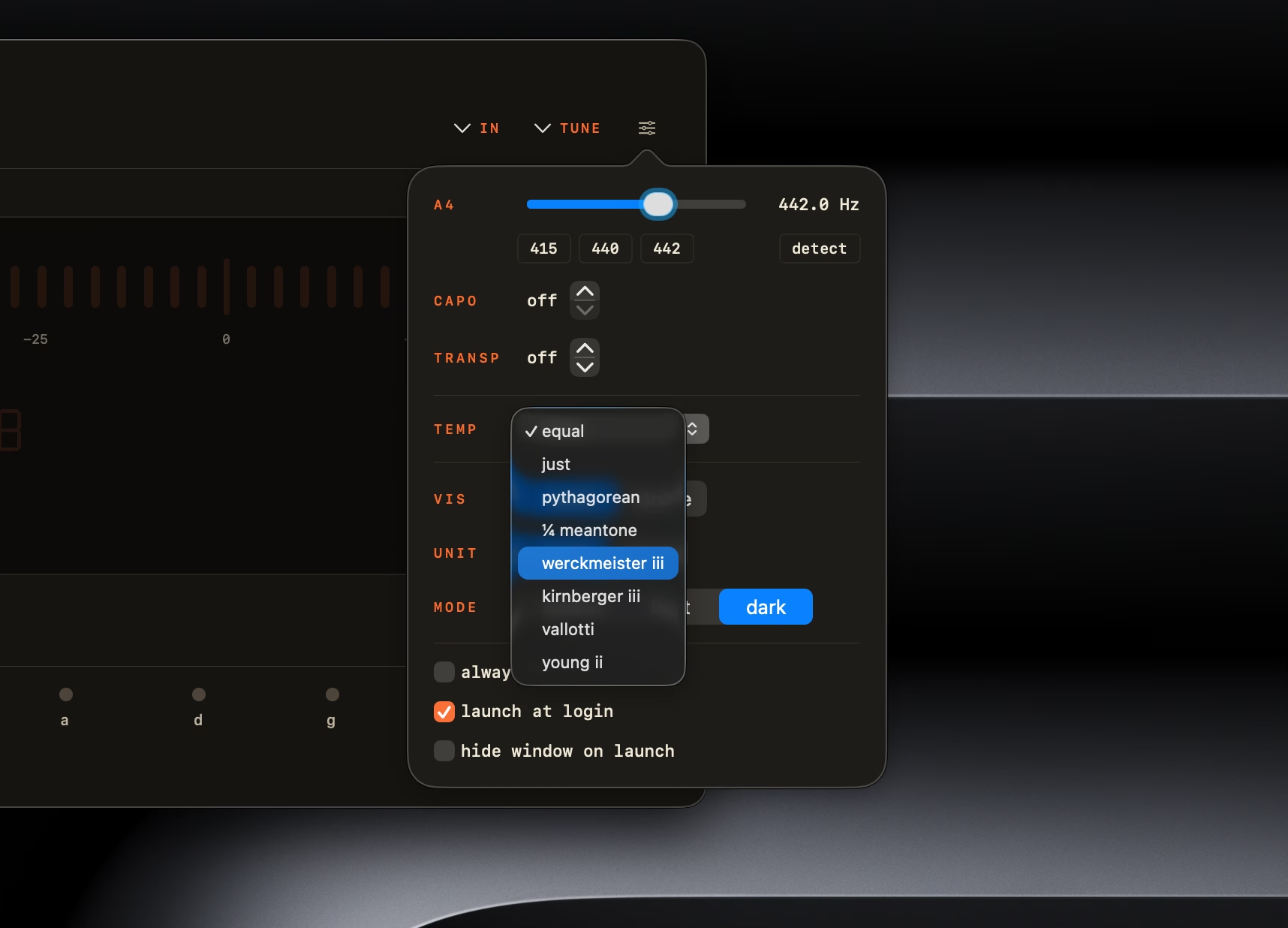
Choisissez l’accordage standard, le Drop D, le DADGAD, l’Open G, l’Open D, un demi-ton plus bas ou la guitare à 7 cordes. Indiquez la position du capodastre de la 1re à la 11e case pour adapter les notes de référence. La transposition de ±11 demi-tons et le diapason réglable permettent de vous accorder avec votre groupe ou un orchestre, notamment à 415, 440 ou 442 Hz.
Ouvrez le panneau de 360 px depuis la barre des menus en 200 ms, ou gardez la fenêtre principale au premier plan pendant que vous jouez. L’app coûte 6,99 € en achat unique, avec toutes les mises à jour 1.x incluses. Sans abonnement, sans compte et sans statistiques d’utilisation.
Pourquoi l’app Mac
Toujours à un clic.
Chromatic Tuner vit dans votre barre des menus : un clic l’ouvre en moins de 200 ms, et il fonctionne entièrement hors ligne. Gardez la fenêtre au premier plan pendant l’enregistrement, ou lancez-le au démarrage de votre Mac.
Il écoute ce que vous jouez, là où vous le jouez : micro intégré, interface audio USB ou périphérique agrégé, à pleine fréquence d’échantillonnage via Core Audio, juste à côté de votre DAW. L’accordeur gratuit du navigateur dépanne partout ; l’app Mac est celle qui est toujours prête.
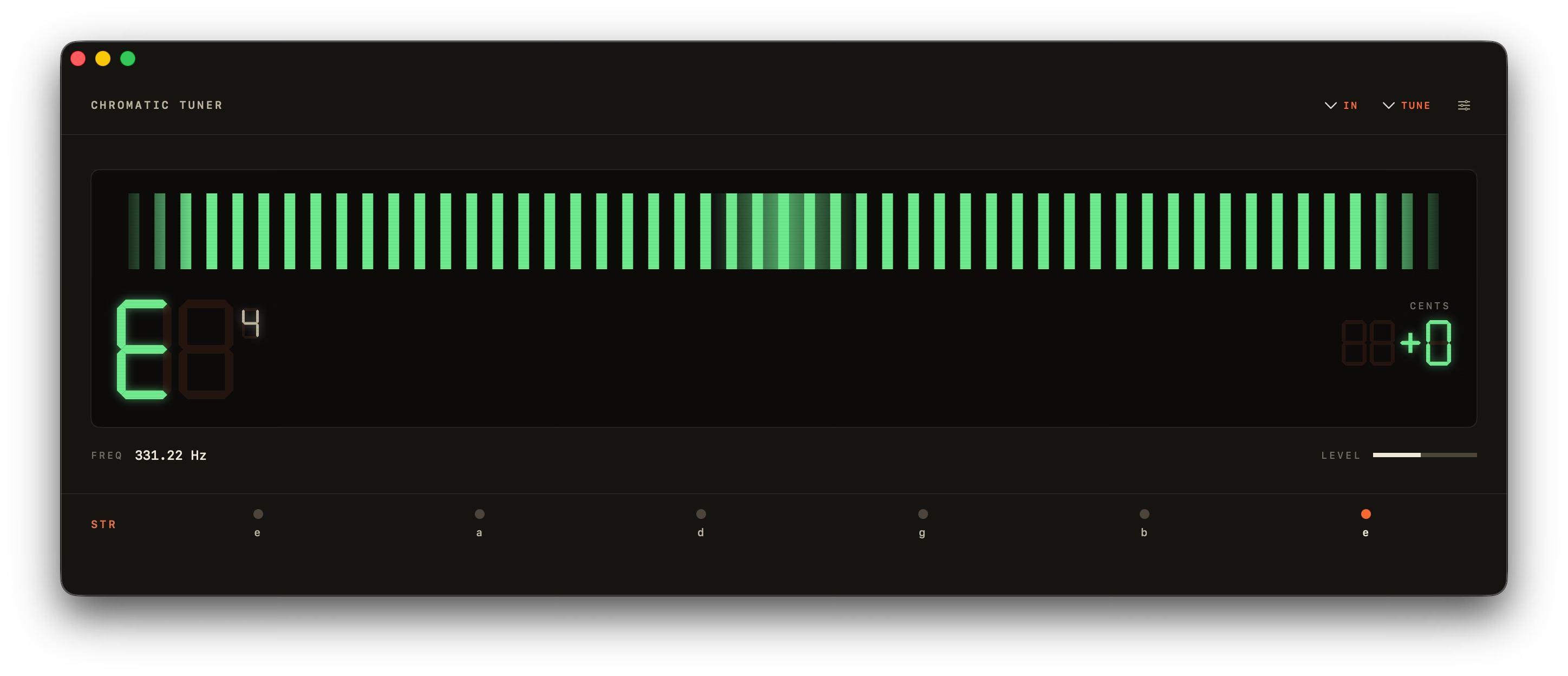
L’indicateur et le stroboscope.
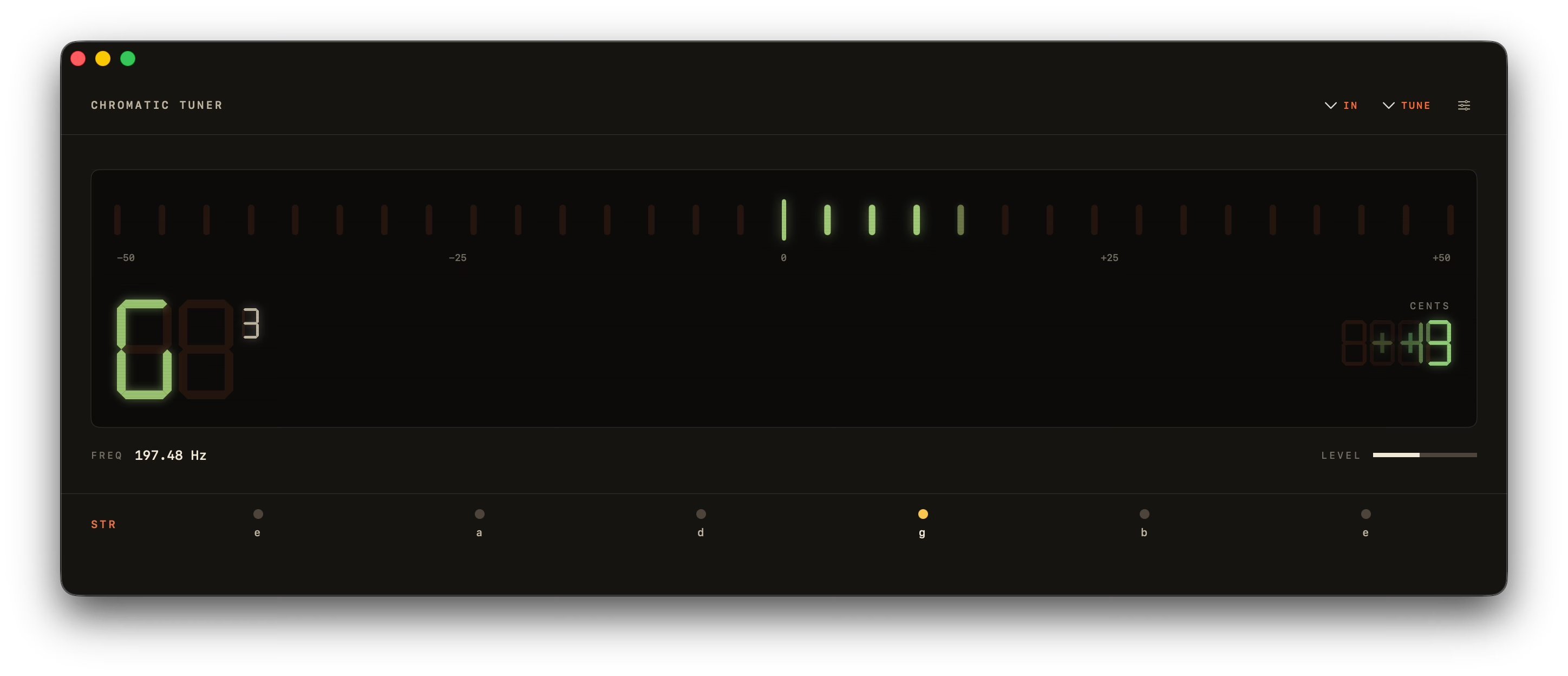
La barre de 31 LED vous guide pour accorder chaque corde. Les segments passent de l’orange au vert lorsque la note est juste, avec un temps de réponse inférieur à 50 ms.
Pour affiner l’accordage sur une note tenue, utilisez le stroboscope rotatif de type Peterson. Ses bandes s’immobilisent lorsque l’écart reste dans une plage de ±0,5¢ : vous voyez précisément quand la note est juste. Vous pouvez aussi choisir une aiguille analogique rétro ou une onde sinusoïdale animée.
Sous le capot
Neuf fonctions pour un accordage précis.
Ouvrez l’accordeur, ajustez votre instrument et reprenez votre morceau. Chaque fonction est conçue pour rendre ces gestes simples et rapides.
- −500+50CentsFreq82.40 Hz
Détection de hauteur YIN
Détecte les notes de A0 à C8 (27,5 Hz – 4186 Hz), avec une précision de ±0,14¢ sur des sons purs et de ±1¢ en conditions réelles. La correction des erreurs d’octave évite d’afficher une note une octave trop haut lorsqu’une corde est pincée.
Quatre modes d’affichage
Choisissez dans la barre d’outils entre une barre à LED, un stroboscope de type Peterson qui s’immobilise dans une plage de ±0,5¢, une aiguille analogique rétro et une onde sinusoïdale animée.
- BPM
Métronome intégré
Travaillez à un tempo de 40–240 BPM, avec des mesures de 2/4 à 7/8 et un premier temps accentué. Vous pouvez donner le tempo en tapotant et lancer le métronome avec la barre d’espace. Sa fenêtre indépendante reste ouverte à côté de l’accordeur.
- — HzTouchez une corde pour l’entendre
Sons de référence
Cliquez sur une corde pour entendre un son pur.
Préréglages par instrument
17 réglages pour guitare, basse et autres cordes.
Dans votre barre des menus
Un panneau de 360 px, à un clic.
- A4TR 0Hz
Diapason et transposition
349–499,9 Hz et ±11 demi-tons.
- ArrêtéSpace123456⌘WAppuyez sur Espace ou 1–6
Pensé pour le clavier
Espace pour lancer et arrêter. ⌘W, ⌘Q.
Thème clair, sombre ou automatique
Suivez le thème de macOS ou choisissez le vôtre.
Design
À portée de main, sans vous encombrer.
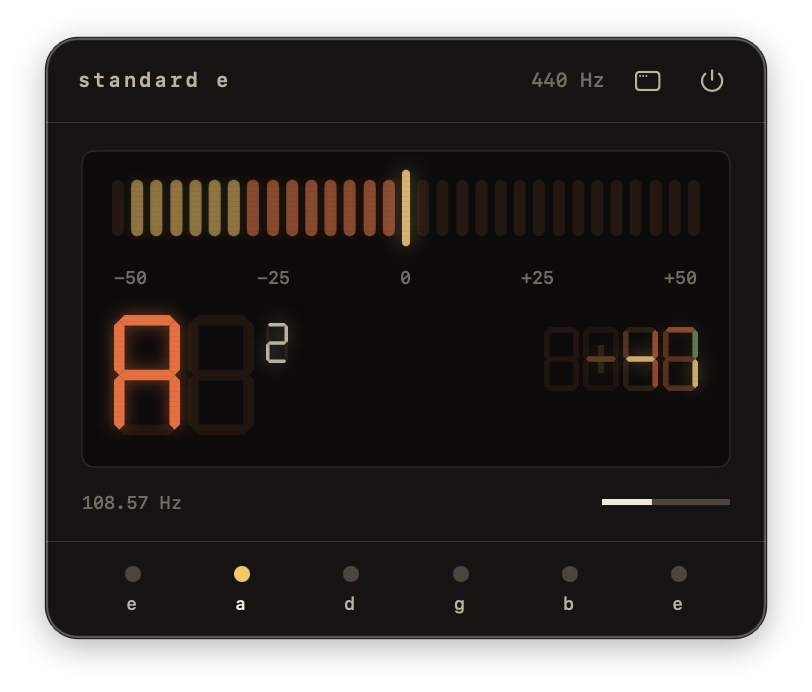
Ouvrez le panneau de 360 px depuis la barre des menus entre deux prises et retrouvez les réglages dans le volet latéral. Gardez l’app dans le Dock ou utilisez uniquement la barre des menus. Son interface s’inspire des accordeurs physiques et s’adapte au thème de macOS.
Comment ça marche
Installez, autorisez le micro, accordez.
- 01
Ouvrez Chromatic Tuner
Ouvrez le fichier DMG et glissez Chromatic Tuner dans le dossier Applications. Lancez ensuite l’app depuis Spotlight ou la barre des menus. Aucun compte ni activation de licence nécessaire.
- 02
Autorisez l’accès au micro
Acceptez la demande d’accès au micro de macOS. L’app utilisera votre entrée audio par défaut, qu’il s’agisse du micro intégré ou d’une interface USB. Tout le son est traité sur votre appareil.
- 03
Pincez une corde
L’indicateur à LED affiche l’écart par rapport à la note la plus proche. L’ambre signale qu’il faut encore ajuster la corde ; le vert indique qu’elle est juste. Accordez jusqu’à ce que l’indicateur reste au vert quelques instants.
iPhone et Apple Watch
Aussi dans votre poche.
ChromTuner: Guitar Tuner utilise le même algorithme YIN sur iPhone et Apple Watch, gratuitement : mode chromatique, standard ou Drop D, indicateur à LED ou aiguille analogique, une légère vibration lorsque la corde est juste, un métronome et le suivi de l’usure des cordes. Un paiement unique de 6,99 € ajoute le stroboscope, les tempéraments historiques, tous les accordages et le reste.
Gratuit pour toujours — sans pub, sans compte, sans abonnement.
ChromTuner pour Mac
Un seul achat. À vous pour toujours.
À payer aujourd’hui
Achat unique · mises à jour 1.x à vie
Pas de remboursement pour un simple changement d’avis. Si l’app ne fonctionne pas comme décrit et que nous ne pouvons pas corriger le problème, vous êtes remboursé.
- Chromatic Tuner pour Mac avec puce Apple Silicon ou processeur Intel
- Fonctionne sous macOS 14 Sonoma ou ultérieur
- Mises à jour 1.x à vie incluses
- Assistance par e-mail, directement auprès du développeur
Vous préférez le Mac App Store ? Même app, même prix.

Après le paiement
- 1Reçu envoyé par e-mail
- 2Lien de téléchargement valable 7 jours (expiré ? ouvrez-le pour en recevoir un nouveau)
- 3Glissez Chromatic Tuner dans le dossier Applications
Cet achat concerne l’app Mac. ChromTuner Pro sur iPhone (acheté dans l’app iPhone) et Explorateur d’accords Pro (sur chromtuner.com/chords) sont des achats uniques distincts.
FAQ
Les réponses à vos questions.
Tout savoir sur les instruments compatibles, les tempéraments, la précision et le fonctionnement de l’app.
En quoi Chromatic Tuner diffère-t-il des accordeurs gratuits pour macOS ?
Chromatic Tuner utilise Core Audio pour accéder directement au son de votre Mac, avec une précision de ±1¢ en conditions réelles. Vous pouvez utiliser une interface audio et accorder hors ligne, sans publicité ni compte. Dans un navigateur, seul le micro choisi par le navigateur est disponible ; sur un téléphone, le traitement du micro peut modifier le signal. Les 6,99 € comprennent les mises à jour 1.x et une assistance directe par e-mail.Fonctionne-t-il sur les Mac Intel et Apple Silicon ?
Oui. La même app fonctionne nativement sur les Mac Intel et Apple Silicon. Dans les deux cas, macOS 14 Sonoma ou une version ultérieure est nécessaire.Chromatic Tuner fonctionne-t-il hors ligne ?
Oui. La détection des notes s’effectue sur votre Mac et fonctionne sans connexion. Le son est traité en mémoire et ne quitte pas votre appareil. Aucun compte n’est nécessaire et l’app ne collecte pas de statistiques d’utilisation.Prend-il en charge les accordages alternatifs, le capodastre et d’autres instruments ?
Oui. L’app propose 17 préréglages : guitare (standard, Drop D, DADGAD, Open G, Open D, un demi-ton plus bas et 7 cordes), basse (4 cordes EADG et 5 cordes BEADG), violon, alto, violoncelle, contrebasse, ukulélé, mandoline, banjo à 5 cordes et mode chromatique. Vous pouvez régler le capodastre jusqu’à la 11e case, modifier le diapason et transposer jusqu’à ±11 demi-tons.Puis-je l’utiliser uniquement depuis la barre des menus ?
Oui. Activez le mode barre des menus dans les réglages. L’icône de Chromatic Tuner ouvre alors un panneau compact de 360 px, tandis que la fenêtre principale reste masquée.Quelle est la précision de l’accordeur ?
La précision est de ±0,14 cent sur des sons sinusoïdaux purs et de ±1 cent en conditions réelles. L’indicateur passe au vert lorsque l’écart reste dans une plage de ±5 cents. L’algorithme YIN analyse des fenêtres de 4096 échantillons, corrige les erreurs d’octave des cordes pincées et stabilise l’affichage grâce à un filtre médian sur 5 échantillons et à un lissage exponentiel. L’affichage est actualisé environ 22 fois par seconde.Existe-t-il un essai gratuit ?
Vous pouvez essayer le même algorithme YIN gratuitement sur chromtuner.com/fr/tune avant d’acheter l’app Mac. L’app ajoute les interfaces USB via Core Audio, les affichages stroboscope, aiguille et forme d’onde, 17 préréglages pour différents instruments, 7 tempéraments historiques, des réglages pour le capodastre, la transposition, un accès depuis la barre des menus et le fonctionnement hors ligne. Pour toute autre question, écrivez à support@chromtuner.com. Nous répondons généralement en quelques heures.

Prêt à accorder ?
Un accordeur pour macOS, précis à ±1¢ et entièrement hors ligne. Paiement unique de 6,99 €, avec toutes les mises à jour 1.x incluses.
Acheter pour 6,99 €Fiche technique
Les détails techniques
| Système d’exploitation | macOS 14.0 (Sonoma) ou version ultérieure |
|---|---|
| Architectures | Apple Silicon (arm64) + Intel (x86_64), binaire universel |
| Algorithme de détection de hauteur | YIN, fenêtre de 4096 échantillons avec 50 % de recouvrement |
| Plage de détection | A0 (27,5 Hz) → C8 (4186 Hz) |
| Précision | ±0,14¢ sur des sinusoïdes pures, ±1¢ en conditions réelles |
| Fréquence de rafraîchissement | ~22 Hz |
| Latence | Moins de 50 ms perçus |
| Lissage | Filtre médian sur 5 échantillons et lissage exponentiel ; filtre passe-haut à 70 Hz avant détection |
| Entrée audio | Micro intégré, interfaces USB, périphériques agrégés et détection des périphériques branchés en cours d’utilisation |
| Tempéraments | 8 systèmes d’accordage, avec tonique réglable pour les tempéraments inégaux |
| Préréglages par instrument | 17 réglages pour guitare, basse et autres instruments à cordes, mode chromatique et réglages du capodastre |
| Taille du fichier | DMG d’environ 5 Mo |
| Réseau | Inutile pour accorder · vérification quotidienne des mises à jour facultative |
| Confidentialité | Sandbox, Hardened Runtime, Privacy Manifest, aucune télémétrie |
| Mises à jour | Mises à jour à vie pour la version 1.x, incluses dans l’achat |
| Licence | Achat unique à titre personnel, un seul utilisateur |
À voir aussi
D’autres façons d’accorder
- Accordeur de guitare hors ligne pour MacSans internet. Sans télémétrie. Sans compte.
- Accordeur de guitare dans la barre des menus du MacÀ un clic de la barre des menus. Panneau de 360 px.
- Accordeur de guitare pour interface audio USB sur MacCore Audio. Pleine fréquence d’échantillonnage. Moins de 50 ms.